Pour se présenter sur Viv@ de façon plus "amicale" les élèves du Lycée Francesco Cecioni en Italie, à Livorno, ont choisi de créer de petits films. Ils avaient déjà crée des B.D. numériques car cela leur avait semblé sympa de "bavarder" dans l'espace "café" de Viv@ d'une façon plus...réelle bien que....virtuelle!
Au fait, c'est bien vrai: la vie dans notre village virtuel va devenir moins virtuelle car elle passe par les liens qui se tissent parmi les jeunes et la découverte réciproque de leurs vies et de leurs habitudes!
Tuesday, October 21, 2008

ce que je suis
voilà un exemple de comment utiliser de façon creative un outil tel que movie maker pour mettre les élèves en rélation: on a vu la chanson de holden"ce que je suis" et les élèves ont crée des vidéos
*//susanna..
Caterina&Benedetta...
Voilà un exemple de comment utiliser de façon créative un outil tel que movie maker pour mettre les élèves en rélation: on a vu la chanson de Holden "ce que je suis"et les élèves ont crée des vidéos.
Ce que je suis!
Voilà un exemple de comment utiliser de façon créative on outil tel que movie maker pour mettre les élèves en rélation: on a vu la chanson de Holden "Ce que je suis" et les élèves ont crée des vidéos.
Ce que je suis
Voilà un exemple de comment utiliser de façon créative un outil tel que movie maker pour mettre les élèves en rélation: on a vu la chanson de Holden " ce que je suis" et les élèves ont crée des vidéos...
Sunday, October 19, 2008
Students are talking on Viva!

Here it is, mid-October, and our students are off to a good start exchanging messages! On the Viva forums you will find quite a few student messages both introducing themselves and discussing specific project ideas.
- In the Science Lab forum, students from Germany have briefly presented their project ideas in English, and they've already got two brief responses from Romania. Next week I will get one of my classes to respond there as well, and I will encourage my students to choose one of the German students' projects to contribute ideas to.
- Also in the Science Lab forum, one of my classes (here in France) has written about global warming (in English). We would love to have answers from all interested participants!
- In the Forum Europa, Marina in Italy has written (in French) about a "Saving Our Planet" video set to a rap song, and students here in France have responded.
- Also in the Forum Europa, Lavinia in Romania has written about "Tree Planting Day". I responded with a few links about deforestation, and I'll get one of my classes to respond to that message soon.
- In the Cafe forum, students from Germany, Romania, Italy and France have all started introducing themselves, both in English and in French. I suggest that you have your students write messages both in their target language and in their native language. I know some students in my school are studying Italian, German and Spanish, so perhaps we can get some discussions going in those languages, in parallel with our project messages.
Our project is off to a great start. I've added several of you as co-authors here on this blog, so don't hesitate to post specific project ideas here. It's a shared space, so just jump right in and contribute!
Cheers, --- Phil
FRENCH VERSION
Nous voici mi-octobre, et nos élèves ont commencé à échanger des messages! Sur les forums Viva vous trouverez beaucoup de messages des élèves qui se présentent et qui discutent des idées de projet.
- Dans le forum Science Lab, des élèves en Allemagne ont présenté brièvement leur idées de projet, en anglais. Ils ont déjà deux réponses courtes de la Roumanie. La semaine prochaine j'enverrai une de mes classes pour qu'ils choisissent un des projets des allemands pour échanger leurs idées.
- Aussi dans le forum Science Lab, une de mes classes (ici en France) a écrit sur le sujet du réchauffement de la planète (en anglais). Nous aimerions vraiment avoir des réponses des autres partenaires!
- Dans le Forum Europa, Marina en Italie a écrit (en français) au sujet d'une vidéo "Sauvons notre planète" sur une chanson rap, et des élèves français ont répondu.
- Aussi dans le Forum Europa, Lavinia en Roumanie a écrit sur "Tree Planting Day" - une journée pour planter des arbres. J'ai répondu avec quelques liens sur la déforestation, et une de mes classes répondra bientôt à ce thème.
- Dans le forum Cafe, des élèves en Allemagne, Roumanie, Italie et France ont commencé à se présenter, à la fois en anglais et en français. Je suggère de demander à vos élèves de se présenter à la fois dans leur langue cible et dans leur langue maternelle. Je sais que certains des élèves dans mon lycée étudient l'allemand, l'italien et l'espagnol, donc qui sait, nous engendrerons peut-être des conversations dans ces langues en parallèle aux messages sur notre projet.
Notre projet a bien démarré. Je vous ai ajouté en tant que co-auteurs sur ce blog, donc n'hésitez pas à mettre ici des messages sur notre projet commun. C'est un espace partagé, donc n'hésitez pas à franchir le pas de l'échange!
Thursday, July 31, 2008
Tuesday, May 27, 2008
Saving our planet
We are Justyna and Agnieszka from Poland and we have been participating in the project "Saving our planet". We and our students have been communicating with the students in Châteauroux, France and and we had an opportunity to exchange ideas and opinions about such vital global issues such as endangered species, pollution, recycling and oil spills. Our students could learn that their peers from France have the same opinions about how important it is to save our planet and they had a chance to realize that the discussed problems are not only local but , first and foremost, they concern all the citizens in the world. Finally, the project made them ponder what actions they could take to make the world a better place for future generations.
Sunday, May 18, 2008
Evaluating an E-Twinning project and planning for the next step.
Bonjour,
Well, Agnieska and Justyna and their students in Kielcach, Poland have been communicating with my students in Châteauroux, France since November 2007. We've had a few rough spots coordinating our writing efforts, but all in all it's been a very positive collaboration, and one that we're hoping to expand for next year.

We've been using Viva, the Virtual Village, for our exchanges between students. Viva has been live for nearly ten years now, and although it's a very simple, low-bandwidth forum-based interface, it's still a great tool for encouraging students to write to each other in their target language. You can see most of this year's student writing and exchange in the "Forum Europa" and "Science Lab" forums.

Our general topic has been "Saving Our Planet", as explained in an earlier blog entry. Our students have exchanged or written on topics like endangered species, pollution, recycling and oil spills.

Now, with the current school year winding to a close, I'm looking for new partners in other countries to add to our project. I've already gotten favorable responses from Ana in Romania and Marina in Italy, and am waiting on a few others. If we can get students at five or six different sites all communicating on the same topics, I think we'll see a very favorable group dynamic developing.
More soon, --- Phil
Well, Agnieska and Justyna and their students in Kielcach, Poland have been communicating with my students in Châteauroux, France since November 2007. We've had a few rough spots coordinating our writing efforts, but all in all it's been a very positive collaboration, and one that we're hoping to expand for next year.

We've been using Viva, the Virtual Village, for our exchanges between students. Viva has been live for nearly ten years now, and although it's a very simple, low-bandwidth forum-based interface, it's still a great tool for encouraging students to write to each other in their target language. You can see most of this year's student writing and exchange in the "Forum Europa" and "Science Lab" forums.

Our general topic has been "Saving Our Planet", as explained in an earlier blog entry. Our students have exchanged or written on topics like endangered species, pollution, recycling and oil spills.

Now, with the current school year winding to a close, I'm looking for new partners in other countries to add to our project. I've already gotten favorable responses from Ana in Romania and Marina in Italy, and am waiting on a few others. If we can get students at five or six different sites all communicating on the same topics, I think we'll see a very favorable group dynamic developing.
More soon, --- Phil
Friday, May 02, 2008
Projetice at the EduCorsica conference

Projetice, the teachers' association that promotes educational uses of ICT, was present at the Salon EduCorsica, the first regional educational conference in Corsica, the 29th and 30th of April 2008 with several activities:
- At the Projetice stand, demonstrations of EdTech projects, teaching projects and resources available to Projetice members.
- In workshops, with classes of primary and middle school students.
Amongst the many resources and services that Projetice provides, you can find:
- Project mentoring
- Training in EdTech methods
- EdTech equipment loans
- Advice for setting up projects (international projects, EdTech equipment and so on)
- Access to online resources like INA, Edu.maxicours.fr and EduMedia.
For those who were present at the EduCorsica conference, you saw the HP "chariot mobile" at the Arrobox stand, two of our industrial partners. We have two HP "chariots mobiles" that we loan to a school for one, two or three months for specific projects with students. On the Projetice website, you will find an example of one of these projects, as well as a short video featuring elementary students at work at the Simine Thoulouze elementary school in Carry-le-Rouet (Bouches-du-Rhône).

At the stand, I presented (amongst other things) the e-twinning project "Saving Our Planet" between the Lycee Pierre et Marie Curie in Chateauroux (France) and the Lyceum Ogólnoksztacce, in Kielcach in Poland. We use the Viva village to communicate on different environmental topics, and in class I use the EWB (Electronic Whiteboard) e-Beam from Speechi that allows me to write directly on webpages, powerpoint presentations or on other sorts of documents, and to have students come to the board to write, or to distribute copies of our lessons, for example.
Monday, April 28, 2008
Projetice au Salon EduCorsica
Projetice, l'association pour les usages pédagogiques des TICE, est présent au Salon EduCorsica, le 1er salon régional de l'éducation en Corse, le 29 et 30 avril 2008 avec plusieurs prestations:
- Sur le stand Projetice, des démonstrations de scénarios pédagogiques et des ressources disponibles aux adhérents de l'association.
- Dans des ateliers pédagogiques avec des classes d'élèves en primaire et au collège.
Parmi les actions et les ressources de l'association, vous trouverez:
- L'accompagnement de projets
- La formation aux usages pédagogiques
- Le prêt de matériel
- Des conseils pour monter un projet (international, d'équipement, etc)
- L'accès à des ressources en ligne, tel que l'INA, Edu.maxicours.fr et EduMedia.
Pour ceux qui étaient présents sur la conférence EduCorsica, vous avez sans doute vu le chariot mobile HP sur le stand d'Arrobox, deux de nos partenaires. Nous avons deux chariots mobiles HP que nous prêtons à un établissement scolaire pendant un, deux ou trois mois pour monter un projet spécifique avec les élèves. Sur le site Projetice vous trouverez un exemple de ces projets, ainsi qu'un court vidéo où on voit les élèves au travail, dans l'école primaire Simone Thoulouze de Carry-le-Rouet (Bouches-du-Rhône).
Sur le stand, je présente entre autres choses le projet e-twinning "Saving our Planet" entre le Lycée Pierre et Marie Curie à Châteauroux et le Lyceum Ogólnoksztacce, à Kielcach en Pologne. Nous utilisons le village Viva pour communiquer sur différents sujets liés à l'environnement, et en classe avec mes élèves j'utilise le TBI e-Beam de Speechi qui me permet de commenter en direct des pages web, power point ou d'autres supports, de faire venir des élèves au tableau et de sauvegarder le travail des élèves pour le leur distribuer par la suite, par exemple.
Friday, March 07, 2008
One week with the EWB eBeam/Speechi
(Pour lire cet article en français)
I recently took advantage of Speechi's ten-day trial offer of their EWB (Electronic Whiteboard) eBeam at my school, the Lycée Pierre et Marie Curie in Châteauroux. What a wonderful tool!
 I started on Monday 25 February. When I arrived at school at around ten that morning, the eBeam was waiting for me. I unpacked it, picked up a videoprojector at the office and headed for my classroom. After plugging in the projector, my laptop and speakers, I plugged in the USB link for the eBeam, stuck it on the standard whiteboard in my classroom, and popped in the installation CD for the eBeam interactive tools, and I was ready to go in about ten minutes.
As I've been doing environmentally-related topics for an ongoing E-Twinning project with a partner school in Poland, I started work on the "Black Tides" website with the flash animation explaning the origins of oil. I had prepared a handout using the text from that unit on the site, with the addition of a vocabulary list and a list of ten questions students could answer from the text and from the animation itself. Using the eBeam pen I was able to stop and start the animation and write annotations right on the whiteboard: things like vocabulary words and answers to the questions with arrows to the relevant parts of the animation. One problem I ran into, though, was that each time I wanted to switch from pen mode to mouse mode (so that I could restart the animation) I had to erase my annotations. It was time for me to discover the eBeam scrapbook tool!
Working from the diagram "evolution of tonnage transported", I began the same way: writing vocabulary and ideas directly onto the projection of the webpage with the eBeam pen. But as soon as students started explaining the diagram with complete sentences, I clicked on the left side of the tool palette to open the eBeam scrapbook tool, a multipage whiteboard organizer. There, I was able to note the sentences students produced, correct them, and note a few grammar points, notably the use of present perfect with "since" to express the notion of duration until the present. One detail you may notice: on each screen capture, there is a central gap: this is due to the whiteboards in our school which fold out for a three-panel blackboard (for chalk) and fold in for a whiteboard that unfortunately remains divided by 3cm metal bar down the middle. In practice, however, this doesn't prevent the eBeam tool from functioning, and students get used to the "gap" very quickly. As you see, I just write around it.
One of the first things I noticed while using the eBeam tool palette is its simplicity. Compared to other electronic whiteboards I've used in the past, the eBeam tools are extremely simplified, which is an important advantage. I showed the eBeam to a group of about 70 other teachers in my school this Wednesday, and when I asked who thought they would want to use this new tool, fully two-thirds of the room raised their hands! I'm certain their overwhelming response was due in large part to this simplicity. When tools are too complex, few teachers are ready to go out on a limb to use them, and they wind up collecting dust at the back of a cupboard. Not the eBeam!
My only worry now is that I won't have the eBeam all to myself any more. We're sending in a request to the regional council board for funding for another half-dozen eBeam whiteboards and projectors, but while we wait for that request to go through the system, I guess I'll just have to share.
 Aside from using the eBeam in the classroom with this project, students are also working on the Viva (Virtual Interactive Village) forums with their foreign correspondents. Their work still needs a bit of correction, but they are going in the right direction.
I hope to be posting a full description of this lesson very soon.
Cheers, --- Phil
I recently took advantage of Speechi's ten-day trial offer of their EWB (Electronic Whiteboard) eBeam at my school, the Lycée Pierre et Marie Curie in Châteauroux. What a wonderful tool!
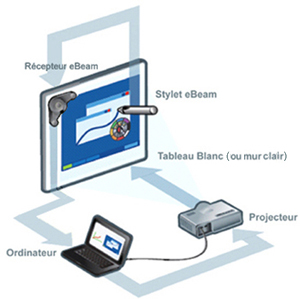 I started on Monday 25 February. When I arrived at school at around ten that morning, the eBeam was waiting for me. I unpacked it, picked up a videoprojector at the office and headed for my classroom. After plugging in the projector, my laptop and speakers, I plugged in the USB link for the eBeam, stuck it on the standard whiteboard in my classroom, and popped in the installation CD for the eBeam interactive tools, and I was ready to go in about ten minutes.
As I've been doing environmentally-related topics for an ongoing E-Twinning project with a partner school in Poland, I started work on the "Black Tides" website with the flash animation explaning the origins of oil. I had prepared a handout using the text from that unit on the site, with the addition of a vocabulary list and a list of ten questions students could answer from the text and from the animation itself.
 Using the eBeam pen I was able to stop and start the animation and write annotations right on the whiteboard: things like vocabulary words and answers to the questions with arrows to the relevant parts of the animation. One problem I ran into, though, was that each time I wanted to switch from pen mode to mouse mode (so that I could restart the animation) I had to erase my annotations. It was time for me to discover the eBeam scrapbook tool!
Working from the diagram "evolution of tonnage transported", I began the same way: writing vocabulary and ideas directly onto the projection of the webpage with the eBeam pen.
 But as soon as students started explaining the diagram with complete sentences, I clicked on the left side of the tool palette to open the eBeam scrapbook tool, a multipage whiteboard organizer. There, I was able to note the sentences students produced, correct them, and note a few grammar points, notably the use of present perfect with "since" to express the notion of duration until the present. One detail you may notice: on each screen capture, there is a central gap: this is due to the whiteboards in our school which fold out for a three-panel blackboard (for chalk) and fold in for a whiteboard that unfortunately remains divided by 3cm metal bar down the middle. In practice, however, this doesn't prevent the eBeam tool from functioning, and students get used to the "gap" very quickly. As you see, I just write around it.
One of the first things I noticed while using the eBeam tool palette is its simplicity.
 Compared to other electronic whiteboards I've used in the past, the eBeam tools are extremely simplified, which is an important advantage. I showed the eBeam to a group of about 70 other teachers in my school this Wednesday, and when I asked who thought they would want to use this new tool, fully two-thirds of the room raised their hands! I'm certain their overwhelming response was due in large part to this simplicity. When tools are too complex, few teachers are ready to go out on a limb to use them, and they wind up collecting dust at the back of a cupboard. Not the eBeam!
My only worry now is that I won't have the eBeam all to myself any more. We're sending in a request to the regional council board for funding for another half-dozen eBeam whiteboards and projectors, but while we wait for that request to go through the system, I guess I'll just have to share.
 Aside from using the eBeam in the classroom with this project, students are also working on the Viva (Virtual Interactive Village) forums with their foreign correspondents. Their work still needs a bit of correction, but they are going in the right direction.
I hope to be posting a full description of this lesson very soon.
Cheers, --- Phil
Wednesday, November 28, 2007
A student activity on Endangered Species
One good way to get students started discussing a topic is to have them work on texts from the online press. Here is the first environment-related activity I did with my students this year, on Endangered Species.
Endangered Species WebQuest
This activity asks students to suggest solutions to the disappearance of endangered species, with the study of an article from BBC Learning English and a WebQuest where they take the role of research scientists.
Part 1: On the BBC Learning English website, you will find an article called "China Dolphin Extinction" that includes a wealth of supporting material, including the text, important vocabulary explained in English, the radio news report students can listen to, and a teacher's lesson plan with several useful activities. I prepared a one-page version of this text with the vocabulary and five general knowledge questions, that you can download as a Word file or PDF file.
Part 2: The WebQuest: Students work in groups of two, taking the role of research scientists. They select one endangered species, visit a range of resource sites to help them describe their species and the risks it faces, then they use the ideas they picked up in class to formulate solutions to the risks facing their chosen species. You can download the student worksheet in Word format or PDF format.
Note that my students studied the BBC article in the classroom, not on the internet. While dealing with the general questions, we treated grammatical topics like cause and effect, obligation and advice, and comparisons that students need at the end of the WebQuest in order to formulate their solutions. We then had a debate around the (rather absurd) assertion that "Extinction is inevitable and trying to save endangered species is a waste of time and money." We also used two activities from the lesson plan on BBC Learning English. I suggest these activities as a useful lead-in to the students' work on the web.
Soon, I will be taking my students back to the internet to write online, on the Viva Virtual Village, about their ideas on endangered species. That will be the point where our students can exchange ideas, and really begin the E-Twinning project in earnest.
Cheers, --- Phil
Endangered Species WebQuest
This activity asks students to suggest solutions to the disappearance of endangered species, with the study of an article from BBC Learning English and a WebQuest where they take the role of research scientists.
Part 1: On the BBC Learning English website, you will find an article called "China Dolphin Extinction" that includes a wealth of supporting material, including the text, important vocabulary explained in English, the radio news report students can listen to, and a teacher's lesson plan with several useful activities. I prepared a one-page version of this text with the vocabulary and five general knowledge questions, that you can download as a Word file or PDF file.
Part 2: The WebQuest: Students work in groups of two, taking the role of research scientists. They select one endangered species, visit a range of resource sites to help them describe their species and the risks it faces, then they use the ideas they picked up in class to formulate solutions to the risks facing their chosen species. You can download the student worksheet in Word format or PDF format.
Note that my students studied the BBC article in the classroom, not on the internet. While dealing with the general questions, we treated grammatical topics like cause and effect, obligation and advice, and comparisons that students need at the end of the WebQuest in order to formulate their solutions. We then had a debate around the (rather absurd) assertion that "Extinction is inevitable and trying to save endangered species is a waste of time and money." We also used two activities from the lesson plan on BBC Learning English. I suggest these activities as a useful lead-in to the students' work on the web.
Soon, I will be taking my students back to the internet to write online, on the Viva Virtual Village, about their ideas on endangered species. That will be the point where our students can exchange ideas, and really begin the E-Twinning project in earnest.
Cheers, --- Phil
Sunday, November 25, 2007
"Saving Our Planet," a new E-Twinning projet for 2007-8
 We're just beginning a new multi-site project encouraging student interaction and communication around the theme "Saving Our Planet", loosely modelled on the project "Our Way to Save the Planet" that's been on the E-Twinning website for the last three years.
What I'd like to set up is a project based in participating schools in at least four different countries. I've already got a tentative agreement from Justina Tracichleb-Lichosik in Kielce, Poland, and I'm exploring links with schools in Ireland, Andorra and perhaps even Morocco. Ideally, I'd like to get several other European countries on board, but that will depend a lot on answers to my emails.
I teach English in the Lycée Pierre et Marie Curie in Châteauroux, France, near Orleans and Tours. My students are mostly aged 16-18, and several of my other colleagues teaching English, Spanish, Italian and German are also interested in participating. I also have two colleagues in "collège" (lower secondary level) with students aged 13-15 who would like to join the project and who would like correspondents at that age group.
My students have already done classroom projects on saving endangered species and on questions of immigration that I thought might be good starting points for exchange with other classes in this project. Here is a list of some other topics I'd like to explore:
Topics: pollution, renewable energy and recycling, overpopulation, famine, natural disasters and international cooperation.
I'm exploring new communication tools, but one of the easiest to use is the Viva Virtual Village, and you'll find other messages in this blog about how to participate.
I envisage the communication and exchange to work like this: Students communicate in a common target language, English, and also in their native language, or an alternate target language, with each message. For example, a student in France would write in both English and French, a student in Poland in both English and Polish, while a student in Ireland might write in both English and in a second language they are studying, such as German or French.
I'm very open to other ideas about communication tools, and would like to explore possibilities for visio-conferencing, and perhaps in future more ambitious projects like Comenius and Socrates so that participating teachers and students can actually travel and meet each other.
For the time being we're just in a discussion and brainstorming phase, but my students are ready to start writing about some of these topics on Viva. I'm going to jump right in with colleagues in Poland and in other schools here in France, and hope to get our partnerships registered at the E-Twinning site as soon as possible.
Please contact me if you're interested or have other ideas to share. Although I've got many of my own ideas, I'd really like to work together with partners to develop a project we can all take a part in shaping.
Cheers, --- Phil at philipbenz@yahoo.fr
Wednesday, June 20, 2007
Démarrer avec un projet E-Twinning
Un projet E-Twinning est une bonne façon de vous lancer dans les TICE, et d'ouvrir votre classe sur le monde, que vous soyez professeur de langues ou d'une autre matière. Il ne nécessite pas beaucoup de ressources, et peut servir de point de départ vers d'autres projets plus ambitieux; il permet aussi d'étayer des demandes de financement de matériel auprès des conseils généraux et régionaux ou du rectorat.
De nombreux outils de communication et de collaboration sont disponibles sur le site E-Twinning. Voici un autre outil, le Village Interactif Virtuel en Ardèche Viva.
 Le projet Viva est un outil de communication "clés en main" du CDDP07 conçu pour faciliter au maximum son utilisation, ce qui vous fait gagner du temps et vous libère pour gérer d'autres aspects de vos projets.
De nombreux outils de communication et de collaboration sont disponibles sur le site E-Twinning. Voici un autre outil, le Village Interactif Virtuel en Ardèche Viva.
Le projet Viva est un outil de communication "clés en main" du CDDP07 conçu pour faciliter au maximum son utilisation, ce qui vous fait gagner du temps et vous libère pour gérer d'autres aspects de vos projets.
Monday, April 02, 2007
Using Viva
For teachers who are new to using Viva with their classes, let me give you a step-by-step explanation.
1) First, you need your own password as a teacher. I can create a teacher password for you, or you can contact the team at the CDDP36 directly. You can reach me at philip.benz@ac-orleans-tours.fr
2) Next, you connect to Viva: http://viva.tice.ac-orleans-tours.fr/dokeos/ log in using your login ("identifiant") and your password ("mot de passe").
3) Next, on the right, log in using your user name("identifiant") and your password ("mot de passe").
4) Next, you can use the administration area, "users / add users" to either create a login identity for each class, or for individual students. I strongly encourage you to create individual logins for each student. For my students, I used the same login and password as the students use when logging into the school network. Note that although you will enter your students full names (first and last names), only their first names will actually appear on the forum messages. This is important, as we are supposed to protect our students' identity. Be sure to tell them never to put in personal information like full names, addresses, phone numbers, or even personal email addresses. Note that you can have students create their own individual login simply by hitting "Registration" on the initial Viva page.
5) Once you have created personal logins for each of your students, you are ready to take them to the internet room in your school. For their first visit, please explain to them the purpose of Viva: it's a tool for communicating ideas in a foreign language to distant partners. They need to understand it isn't a "chatroom" and they shouldn't use inappropriate language, or abbreviations like when they send messages on their cellphones. They should use proper English (or another language) and they should remember to *respect* the other participants - no insults, no bad language, etc. They should also try to always write at least 4-5 lines in each of their messages, or more. This is so that other students who read their messages can understand their ideas, and perhaps have something to respond.
6) The best way to get started is to place a message of your own on a topic you've been working on in class, and have them prepare their messages in advance. then they can respond directly to your "teacher's message".
7) Another good way to participate is to locate messages by other students on a given topic, and ask your students to respond directly to those students, by asking them questions and giving their own point of view. For example, some students have recently written in the "Forum Europa" forum on the topic of "Getting to know each other", where I also asked them some basic questions about the environment. Your students can prepare texts in advance on the topic, and then respond directly to those other students.
8) For good students who write quickly and finish their work before the end of class, you can then allow them to use their remaining class time to visit other forums of their own choosing and write messages on their own, either in response to other students, or starting their own topics. Remember to ask them to explain their ideas, and always write at least 4-5 lines or so. There are a lot of really short messages on the forum, and my feeling is that those short messages don't really give students the opportunity to express their ideas or give others the opportunity to respond in an interesting fashion. Students who want responses need to write more, it's as simple as that.
9) Ideally, we as teachers should talk to each other and plan to have our students write about the same topics, so that they can have direct interaction. Feel free to contact me via email, or you can use the "Teacher's Room" forum to tell about a topic you'd like to work on. I don't have the email addresses of all the teachers using Viva, so the forum may be your only way to reach other participating teachers and their classes.
10) If you have correspondance partners for your classes already, feel free to ask me to give your current partners a teacher login so that they too can use the Viva forums. It's an open project, and there is always room for more participants.
That's it! Once you have your teacher login, just jump right in and participate!
Cheers, --- Phil
1) First, you need your own password as a teacher. I can create a teacher password for you, or you can contact the team at the CDDP36 directly. You can reach me at philip.benz@ac-orleans-tours.fr
2) Next, you connect to Viva: http://viva.tice.ac-orleans-tours.fr/dokeos/ log in using your login ("identifiant") and your password ("mot de passe").
3) Next, on the right, log in using your user name("identifiant") and your password ("mot de passe").
4) Next, you can use the administration area, "users / add users" to either create a login identity for each class, or for individual students. I strongly encourage you to create individual logins for each student. For my students, I used the same login and password as the students use when logging into the school network. Note that although you will enter your students full names (first and last names), only their first names will actually appear on the forum messages. This is important, as we are supposed to protect our students' identity. Be sure to tell them never to put in personal information like full names, addresses, phone numbers, or even personal email addresses. Note that you can have students create their own individual login simply by hitting "Registration" on the initial Viva page.
5) Once you have created personal logins for each of your students, you are ready to take them to the internet room in your school. For their first visit, please explain to them the purpose of Viva: it's a tool for communicating ideas in a foreign language to distant partners. They need to understand it isn't a "chatroom" and they shouldn't use inappropriate language, or abbreviations like when they send messages on their cellphones. They should use proper English (or another language) and they should remember to *respect* the other participants - no insults, no bad language, etc. They should also try to always write at least 4-5 lines in each of their messages, or more. This is so that other students who read their messages can understand their ideas, and perhaps have something to respond.
6) The best way to get started is to place a message of your own on a topic you've been working on in class, and have them prepare their messages in advance. then they can respond directly to your "teacher's message".
7) Another good way to participate is to locate messages by other students on a given topic, and ask your students to respond directly to those students, by asking them questions and giving their own point of view. For example, some students have recently written in the "Forum Europa" forum on the topic of "Getting to know each other", where I also asked them some basic questions about the environment. Your students can prepare texts in advance on the topic, and then respond directly to those other students.
8) For good students who write quickly and finish their work before the end of class, you can then allow them to use their remaining class time to visit other forums of their own choosing and write messages on their own, either in response to other students, or starting their own topics. Remember to ask them to explain their ideas, and always write at least 4-5 lines or so. There are a lot of really short messages on the forum, and my feeling is that those short messages don't really give students the opportunity to express their ideas or give others the opportunity to respond in an interesting fashion. Students who want responses need to write more, it's as simple as that.
9) Ideally, we as teachers should talk to each other and plan to have our students write about the same topics, so that they can have direct interaction. Feel free to contact me via email, or you can use the "Teacher's Room" forum to tell about a topic you'd like to work on. I don't have the email addresses of all the teachers using Viva, so the forum may be your only way to reach other participating teachers and their classes.
10) If you have correspondance partners for your classes already, feel free to ask me to give your current partners a teacher login so that they too can use the Viva forums. It's an open project, and there is always room for more participants.
That's it! Once you have your teacher login, just jump right in and participate!
Cheers, --- Phil
Tuesday, January 23, 2007
E-Twinning avec de nouveaux outils
Depuis bientôt deux ans, le projet européen E-Twinning propose de vous aider à trouver des partenaires dans d'autres pays européens, pour organiser des projets communs de communication entre élèves. Cet atelier vous propose une initiation au projet E-Twinning, ainsi que des outils pour réussir votre projet, tels que weblogs et les forums en ligne du village interactif virtuel Viva.
Que vous ayez participé à l'atelier au CDDP36, ou que vous ayez découvert ce blog par hasard, vous pouvez participer à la discussion autour du thème des échanges internationaux entre élèves.
Cheers, --- Phil
Que vous ayez participé à l'atelier au CDDP36, ou que vous ayez découvert ce blog par hasard, vous pouvez participer à la discussion autour du thème des échanges internationaux entre élèves.
Cheers, --- Phil
Subscribe to:
Posts (Atom)